

Advanced Technical SEO Guide: Core Web Vitals Optimization, Schema Markup, Site Speed Improvement, Crawl Budget Optimization, and Search Console Error Fix
Technical SEO plays a crucial role in improving website visibility and performance in search engines. Even if your content is excellent, poor technical optimization can prevent your site from ranking well. Search engines prioritize websites that are fast, structured properly, and easy to crawl.
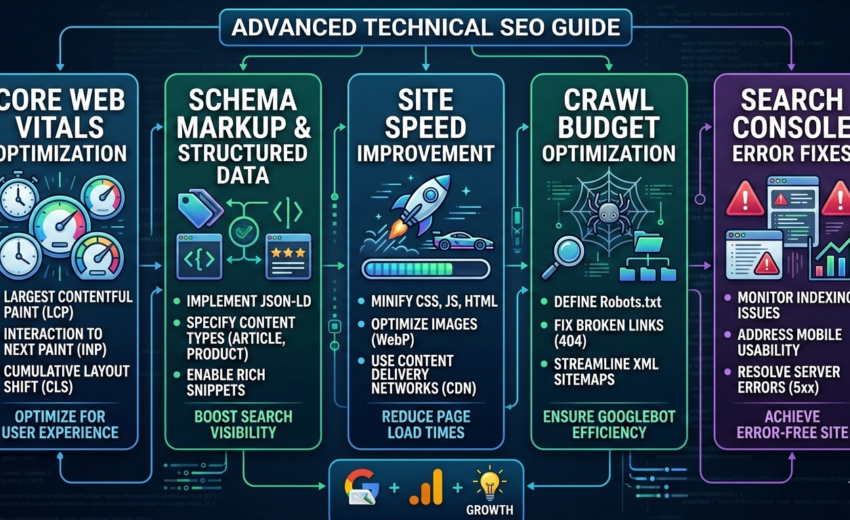
Tools like Google Search Console and Google PageSpeed Insights help website owners identify technical issues and improve site performance. By focusing on Core Web Vitals optimization, schema markup, site speed improvement, crawl budget optimization, and fixing Search Console errors, you can significantly improve your SEO results.
This guide explains how these elements work and how to implement them effectively.
Understanding Core Web Vitals Optimization
Core Web Vitals are performance metrics that measure how users experience your website. These signals are used by Google as ranking factors.
The three main Core Web Vitals metrics include:
Largest Contentful Paint (LCP)
LCP measures how quickly the largest visible element on a page loads. Ideally, this should happen within 2.5 seconds.
Ways to improve LCP include:
Using faster hosting
Optimizing images
Enabling browser caching
Using a content delivery network (CDN)
First Input Delay (FID)
FID measures how quickly your website responds when a user interacts with it, such as clicking a button or link.
To improve FID:
Reduce heavy JavaScript
Use lightweight scripts
Minimize third-party plugins
Cumulative Layout Shift (CLS)
CLS measures visual stability. If elements move unexpectedly while loading, the user experience becomes poor.
To reduce CLS:
Define image and video dimensions
Avoid dynamic content shifting
Use proper font loading techniques
Improving these metrics can significantly enhance both user experience and search rankings.
Schema Markup and Structured Data
Schema markup helps search engines better understand your website content. It is a form of structured data that provides additional information about your pages.
Schema markup is commonly implemented using standards from Schema.org.
Benefits of schema markup include:
Rich search results
Better content understanding by search engines
Higher click-through rates
Common schema types include:
Article schema
FAQ schema
Product schema
Review schema
Organization schema
For example, adding FAQ schema can allow your content to appear with expandable questions directly in search results.
Site Speed Improvement
Website speed is a major ranking factor and directly affects user experience. Slow websites increase bounce rates and reduce conversions.
Tools like Google PageSpeed Insights and GTmetrix can analyze speed issues and provide recommendations.
Key Methods to Improve Site Speed
Image Optimization
Large images can slow down your website. Compress images and use modern formats like WebP.
Enable Caching
Caching stores temporary copies of pages so they load faster for returning visitors.
Minify CSS and JavaScript
Removing unnecessary spaces and code reduces file size and improves loading speed.
Use a Content Delivery Network (CDN)
CDNs distribute website content across multiple global servers, reducing loading time for users in different locations.
Crawl Budget Optimization
Search engines allocate a limited amount of resources to crawl each website. This is known as the crawl budget.
If your crawl budget is wasted on unnecessary pages, important content may not get indexed properly.
Ways to Optimize Crawl Budget
Remove Duplicate Content
Duplicate pages confuse search engines and waste crawl resources.
Use Robots.txt Properly
The robots.txt file tells search engines which pages they should or should not crawl.
Fix Broken Links
Broken links create poor user experience and waste crawling efforts.
Improve Internal Linking
Strong internal linking helps search engines discover and index important pages faster.
Monitoring crawl activity through Google Search Console can help identify crawl-related issues.
Fixing Search Console Errors
Google Search Console is one of the most powerful tools for monitoring website health and detecting SEO issues.
Common errors reported in Search Console include:
Indexing Errors
These occur when pages cannot be indexed by search engines.
Solutions include:
Checking robots.txt settings
Ensuring pages are not marked “noindex”
Submitting updated sitemaps
404 Errors
A 404 error means the page does not exist.
Fix this by:
Redirecting the URL
Updating internal links
Removing outdated pages
Mobile Usability Issues
Since mobile-first indexing is widely used, websites must be fully responsive.
Ensure:
Text is readable without zooming
Buttons are easy to click
Pages fit mobile screens correctly
Regularly reviewing Search Console reports helps maintain a healthy website.
Best Practices for Technical SEO Success
To maintain strong technical SEO performance, follow these best practices:
Monitor site performance regularly
Fix crawl errors quickly
Optimize Core Web Vitals continuously
Implement structured data properly
Keep your website lightweight and fast
Technical SEO is not a one-time task. Continuous monitoring and improvements are necessary to maintain strong search visibility.
Conclusion
Technical SEO is the foundation of a successful website. By focusing on Core Web Vitals optimization, schema markup, site speed improvement, crawl budget optimization, and fixing Search Console errors, website owners can significantly enhance both user experience and search engine rankings.
Tools like Google Search Console and Google PageSpeed Insights make it easier to identify technical problems and optimize website performance.
When these strategies are implemented correctly, your website becomes faster, easier to crawl, and more visible in search results, ultimately leading to better traffic and long-term online growth.